

Go/No-Go Buddy: Go/No-Go task app
Go/No-Go Buddy runs the Go/No-Go task on iPhone, iPad and Android. Participants tap for a green circle and hold back for a red one, and the app scores every trial as a hit, miss, false alarm or correct rejection.
One-time purchase · No subscription · No account · iOS & Android · 9 languages
What the Go/No-Go task measures
In the Go/No-Go task, participants respond as quickly as possible to frequent go stimuli and withhold their response to less frequent no-go stimuli. Because responding becomes the habit, stopping on no-go trials takes effort. Errors on those trials measure response inhibition and impulse control, and missed go trials reflect lapses of attention. The task is widely used in research on executive function, impulsivity and ADHD.
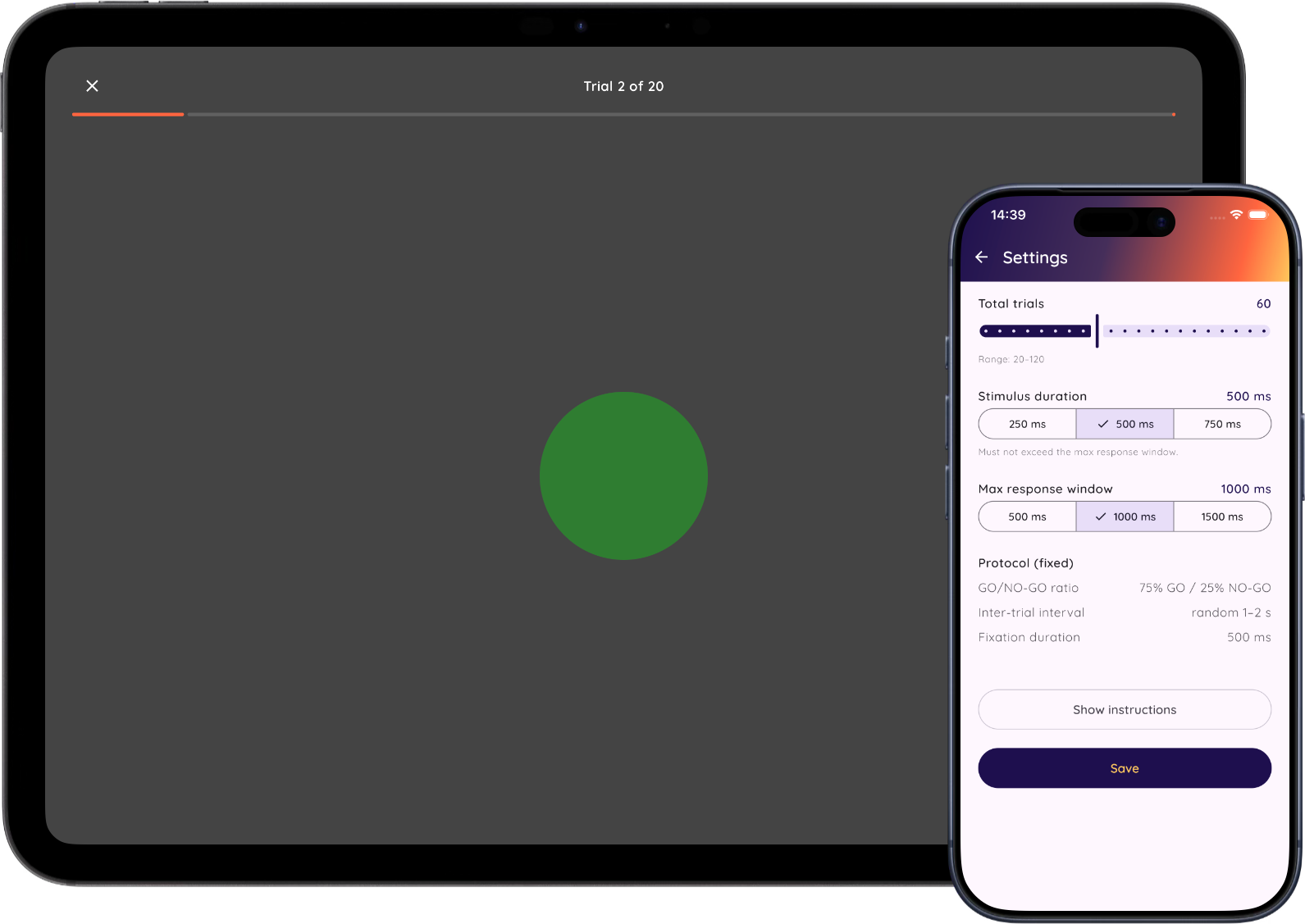
Settings
- Number of trials: 20 to 120 in steps of 5 (default 60).
- Stimulus duration: 250, 500 or 750 ms (default 500).
- Response window: 500, 1000 or 1500 ms (default 1000).
The protocol is otherwise fixed: 75% go and 25% no-go trials in random order, a 500 ms fixation before each stimulus, and a random 1–2 second interval between trials. Go trials show a green circle, no-go trials a red one, and participants tap anywhere on the screen.
Results and CSV export
After each test you can add a test name, remark, age and gender. The app reports:
- Hits and misses on go trials. Misses are omission errors.
- False alarms and correct rejections on no-go trials. False alarms are commission errors.
- Mean reaction time on hits.
- Inhibition score: correct rejections as a percentage of no-go trials.
The CSV starts each session with its settings and summary scores, followed by one row per trial with the columns trial_index,stimulus_type,stimulus_shown_at,response_at,reaction_time_ms,outcome. Export one session or many at once through the share sheet.
Data and privacy
Go/No-Go Buddy has no account, no server and no analytics. Test results are stored only on the device and leave it only when you export a CSV. On Android, the system's own device backup may include app data. See the privacy policy for details.
Timing
Reaction times are recorded with millisecond resolution using the device clock. A response registers when the finger lifts from the screen. As with any touchscreen task, the screen and touch sensor add a small delay that differs between devices, so use the same device for comparisons within a study. Go/No-Go Buddy runs on iOS 18.2 or later (iPhone and iPad) and Android 7.0 or later.
For research and education. Research Buddies apps are not medical devices and are not intended for diagnosis or treatment.
Go/No-Go Buddy FAQ
Can I use this app for my bachelor or master thesis?
Yes. Go/No-Go Buddy is designed to make it easy to run Go/No-Go sessions that you can compare over time and relate to other cognitive measures in your study.
Can I change the number of trials and the timing?
Yes. You can set the number of trials, the stimulus duration and the response window. The ratio of 75% go to 25% no-go trials is fixed, so sessions stay comparable.
What does the app measure?
Go/No-Go Buddy logs reaction times on go trials, commission errors (responding to no-go stimuli), and omission errors (missing go stimuli) — the standard measures of response inhibition and sustained attention.
How do I cite Go/No-Go Buddy?
Cite it as software, for example in APA 7 style: Byrt. (Year). Go/No-Go Buddy (Version x.y) [Mobile app]. https://researchbuddies.com/gonogo-buddy. Fill in the version you used and the year it was released. Both are shown on the app's App Store or Google Play page.
Reference
- Donders, F. C. (1969). On the speed of mental processes (W. G. Koster, Trans.). Acta Psychologica, 30, 412–431. (Original work published 1868)
Use Go/No-Go Buddy with other Research Buddies apps
Combine Go/No-Go Buddy with Stroop Buddy for Stroop Tests, Vigilance Buddy for Psychomotor Vigilance Task (PVT) tests, NBack Buddy for N-back working memory tasks, Trail Buddy for Trail Making Tests, and Flanker Buddy for selective attention (Eriksen Flanker) tests, or visit the Research Buddies home page to discover all apps.